
How to withdraw to G- Cash in Philippines
To withdraw using G-Cash you first need to have a coins.ph wallet. If you do not have one create one for free on www.coins.ph and set up G-Cash as your cash in option
Log in to your Coins.ph account.
Go to the "Wallet" tab and select "USDT" from the list of supported cryptocurrencies.
Click on the "Receive" button to generate your USDT wallet address.
Save the USDT wallet address on your Clicklancers payment settings HERE
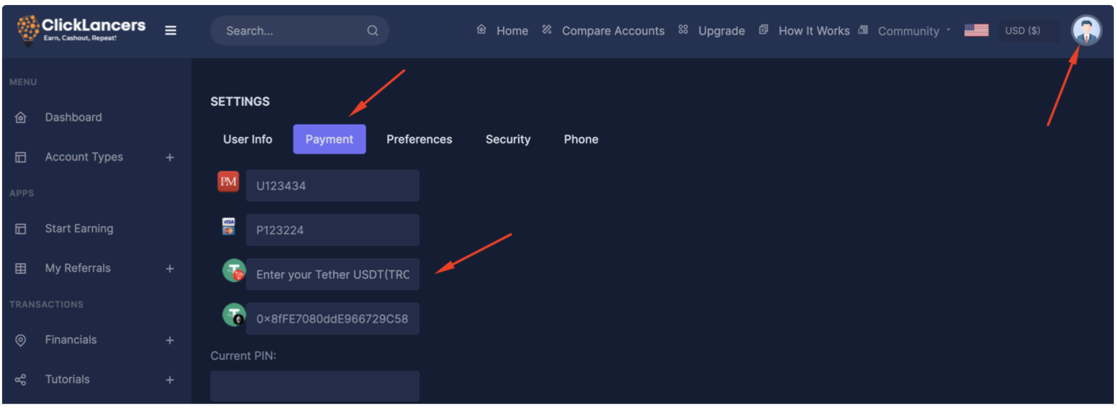
Click on the withdraw option on Clicklancers enter amount and choose cryptocurrency as your preferred method and choose either trc20 to erc20 as your preffered
coin and proceed to withdraw
Once the USDT is sent to your Coins.ph wallet address, it will appear in your USDT wallet balance then you can withdraw your USDTto your G-cash wallet BY following these steps:
Go to the "Wallet" tab and select the cryptocurrency you wish to transfer to G-Cash.
Click on the "Send" button and enter the amount you wish to transfer.
In the recipient field, enter your G-Cash mobile number.
Review your transaction details and click on "Send" to initiate the transfer.
You will receive a confirmation message from Coins.ph and another one from G-Cash once the transfer is complete.
Log in to your Coins.ph account.
Go to the "Wallet" tab and select "USDT" from the list of supported cryptocurrencies.
Click on the "Receive" button to generate your USDT wallet address.
Save the USDT wallet address on your Clicklancers payment settings HERE
Click on the withdraw option on Clicklancers enter amount and choose cryptocurrency as your preferred method and choose either trc20 to erc20 as your preffered
coin and proceed to withdraw
Once the USDT is sent to your Coins.ph wallet address, it will appear in your USDT wallet balance then you can withdraw your USDTto your G-cash wallet BY following these steps:
Go to the "Wallet" tab and select the cryptocurrency you wish to transfer to G-Cash.
Click on the "Send" button and enter the amount you wish to transfer.
In the recipient field, enter your G-Cash mobile number.
Review your transaction details and click on "Send" to initiate the transfer.
You will receive a confirmation message from Coins.ph and another one from G-Cash once the transfer is complete.
Updated on: 10/03/2023
Thank you!